Photography is an odd art. It takes what we all see and turns it an image that makes you see it differently. Little a photographer captures is outside of your normal vision. You may be standing next to the photographer, and not realize you are looking at art till you see the image rendered. Thorsten Overgaard is one of those photographers. His blog generously shares his work and he takes a lot of time to write about it, and has been doing so for many years. It is worth looking at if you ever wonder what there is around you of beauty or drama.
His tool is appropriate to his skill, a Leica M9 currently. It is interesting to read his view of his transition from film to digital, and his reason for using a Leica. Unlike many photographers, it has nothing to do with the brand. It is simply that it works for him in the way he works.
If you have an interest in photography, visit his blog and get inspired. You will up you game.
Showing posts with label tech. Show all posts
Showing posts with label tech. Show all posts
Friday, March 18, 2011


Wednesday, December 22, 2010
iPhone and iPad- Small Consulting Adventure
We are an Apple company, with Macbook Pros and iPhones. Soon we will add an iPad to our tool kit, and I am searching for how to use these tools to improve our work-life. There will be a set of posts on this subject, and perhaps the launch of a new Exechobo related blog. For more detail, go to the new blogsite, dedicated to traveling with technology: ExecHobo Mobile
Tuesday, December 21, 2010
ExecHobo Goes Mobile With a New Blog
I find my posts tend to aggregate into two main themes: Travel, and Tech. I get the travel part- I am the Exechobo. But really, is tech part of the hobo life?
Yes! A significant aspect of traveling today, whether for work or fun is technology. So the Exechobo now has its own site- www.ExecHobo.com All tech related posting will be done there, and here at good old Exechobo.blogspot.com I will post travel related items. So if you have a computer, a cell phone, or a TV, be sure to check out www.ExecHobo.com.
Yes! A significant aspect of traveling today, whether for work or fun is technology. So the Exechobo now has its own site- www.ExecHobo.com All tech related posting will be done there, and here at good old Exechobo.blogspot.com I will post travel related items. So if you have a computer, a cell phone, or a TV, be sure to check out www.ExecHobo.com.
Wednesday, December 8, 2010
Hans Rosling's 200 Countries, 200 Years, 4 Minutes - The Joy of Stats - ...
If you like to think about the world in which we live, human health and wealth, but also like Sports Center, you MUST look at this clip of Hans Rosling, a world class statistic presenter. There is a lot to think about here, history, implications, our place in the world. Don't forget to read the comments, some are good, some stupid.
Wednesday, November 17, 2010
iPhone Apps- Seesmic vs. Tweetdeck
These two iPhone Twitter clients bring similar functionality, that make them head to head competitors. But they have some distinct features that have me puzzled.
I am late to Twitter. I only "got it" when someone explained to me that it is a very abbreviated blog, only more spontaneous. With that, I got into it. You really should follow me.
Of course, I started on my Macbook Pro, using Twitter's native interface online. Not very spontaneous for someone who doesn't spend the day at a desk. So it was completely normal that I would use my Blackberry to tweet. It worked well, and my tweet count mounted. It was functional.
The advent of the iPhone (for me), made tweeting even more of a pleasure, and I saw my counts go over 1,000 soon. It became important to maximize the pleasure of the iPhone experience with a multitasking, Retina interface and full use of the touchscreen.
Both these apps use a set of pages to organize not only Tweets, but multiple Twitter lists, mentions, searches, messages, and Facebook. Additionally on Seesmic you can add a page for Ping, if anyone uses Ping. I currently have several of these columns/pages: All Friends Tweets, Facebook, 2-4 lists, a search for all mentions of @Exechobo, Direct Messages. These vary as my needs change.
TWEETDECK
 Tweetdeck is also a desktop/laptop client, and in that venue, is very powerful, indeed. You set up columns for anything you want to track on Twitter, trending, searches for specific terms and users, the handy and powerful RSS substitute lists, etc, etc. Then, Tweetdeck syncs all this with your other computers and iOS, Android and presumably, Windows Mobile (whatever they are calling it), devices. Very powerful for those who use Twitter professionally.

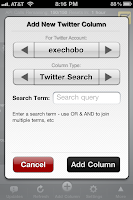 Further, Tweetdeck is stellar at using the touch on the touchscreen. A small swipe sends pages or columns skittering across the iPhone's screen, and a flick scrolls like a native app. The management of columns is easy and quick. I really like that when I open Tweetdeck all the columns are largish thumbnails but readable, and I can slide along them to see what is new (new items are light grey), and then tap a column to bring it to full size and use the column.
You can see tweets locations, and with a simple touch initiate a "Qucikfollow" of anyone you see on Twitter.
When you write a message, you can choose which accounts it will be posted to, including Facebook. Convenient. When creating a post in Tweetdeck, you have other options. Like take or attach a photo, or a video, shorten a link, geo locate a post, add an address for any recent Twitter addresses, or insert a hashtag for the terms most popular, and finally, you can rotate the screen if it helps typing. All very handy! To search for a topic, just start a new column and it will update regularly.
What bugs me about Tweetdeck? First, a minor one, that when I return to it, it always goes back to the start. I have to wait to get it going, during which time all my tweets are updated, a good thing, but then the app doesn't go back to where it was. Kinda like it doesn't get multitasking. And one more thing- How the hell do you do a simple search on Twitter for people? You can't. That's it, you can't.
SEESMIC

 Seesmic looks simpler than it is. I haven't found a missing function yet. I like that my tweets are highlighted. I really like that a searchbar sits at the top of the page.
I like that I can send tweets to Evernote, an app I use alot. This is good for saving items from my lists for action later.
The menu at the bottom of the page is relevant for Facebook and Twitter, but is absent from lists pages.
Seesmic lets you choose to which account you are posting. As well, when posting the option to take or attach a picture, shorten a link, and geo-locate that post is easy to select.
I like that when I select "Retweets" on the menu, at the top of the next screen I can select "by others", "by me" or "of me".
When you add a page to Seesmic you get options to add certain types of pages, including Searches, Trending Topics, and Lists.
One curiosity, why add a page of a single trending topic? Now if it was all trending topics were included, that would be somethin, wouldn't it?
 What bugs me about Seesmic? They can't seem to make the touchscreen work. This is aggravating. Flicking from page to page is frustratingly hit and miss. Almost always miss unless you are at the top of the page. Now who thought that requirement up? The pull down to refresh is expected in many iPhone apps, but in this one it bugs me. And the ads, well they bug me too.
SUMMARY
Both of these apps are very powerful and satisfying to use. I have a hard time deciding which is best, so I keep both handy and switch between them when the mood strikes. Twitter's native client, Ecofon and Tweetbird are all good, but not as powerful, and don't make be admire their power with each use. One cannot go wrong with either Seesmic nor Tweetdeck. What a wonder that this much elegant development work can be had for no charge!
I am late to Twitter. I only "got it" when someone explained to me that it is a very abbreviated blog, only more spontaneous. With that, I got into it. You really should follow me.
Of course, I started on my Macbook Pro, using Twitter's native interface online. Not very spontaneous for someone who doesn't spend the day at a desk. So it was completely normal that I would use my Blackberry to tweet. It worked well, and my tweet count mounted. It was functional.
The advent of the iPhone (for me), made tweeting even more of a pleasure, and I saw my counts go over 1,000 soon. It became important to maximize the pleasure of the iPhone experience with a multitasking, Retina interface and full use of the touchscreen.
Both these apps use a set of pages to organize not only Tweets, but multiple Twitter lists, mentions, searches, messages, and Facebook. Additionally on Seesmic you can add a page for Ping, if anyone uses Ping. I currently have several of these columns/pages: All Friends Tweets, Facebook, 2-4 lists, a search for all mentions of @Exechobo, Direct Messages. These vary as my needs change.
TWEETDECK
 Tweetdeck is also a desktop/laptop client, and in that venue, is very powerful, indeed. You set up columns for anything you want to track on Twitter, trending, searches for specific terms and users, the handy and powerful RSS substitute lists, etc, etc. Then, Tweetdeck syncs all this with your other computers and iOS, Android and presumably, Windows Mobile (whatever they are calling it), devices. Very powerful for those who use Twitter professionally.
The black theme of Tweetdeck is crisp and eye grabbing, and the white of Seesmic really makes the text pop.

 Further, Tweetdeck is stellar at using the touch on the touchscreen. A small swipe sends pages or columns skittering across the iPhone's screen, and a flick scrolls like a native app. The management of columns is easy and quick. I really like that when I open Tweetdeck all the columns are largish thumbnails but readable, and I can slide along them to see what is new (new items are light grey), and then tap a column to bring it to full size and use the column.
 You can see tweets locations, and with a simple touch initiate a "Qucikfollow" of anyone you see on Twitter.
When you write a message, you can choose which accounts it will be posted to, including Facebook. Convenient. When creating a post in Tweetdeck, you have other options. Like take or attach a photo, or a video, shorten a link, geo locate a post, add an address for any recent Twitter addresses, or insert a hashtag for the terms most popular, and finally, you can rotate the screen if it helps typing. All very handy! To search for a topic, just start a new column and it will update regularly.
What bugs me about Tweetdeck? First, a minor one, that when I return to it, it always goes back to the start. I have to wait to get it going, during which time all my tweets are updated, a good thing, but then the app doesn't go back to where it was. Kinda like it doesn't get multitasking. And one more thing- How the hell do you do a simple search on Twitter for people? You can't. That's it, you can't.
SEESMIC

 Seesmic looks simpler than it is. I haven't found a missing function yet. I like that my tweets are highlighted. I really like that a searchbar sits at the top of the page.
 I like that I can send tweets to Evernote, an app I use alot. This is good for saving items from my lists for action later.
The menu at the bottom of the page is relevant for Facebook and Twitter, but is absent from lists pages.
Seesmic lets you choose to which account you are posting. As well, when posting the option to take or attach a picture, shorten a link, and geo-locate that post is easy to select.
I like that when I select "Retweets" on the menu, at the top of the next screen I can select "by others", "by me" or "of me".
When you add a page to Seesmic you get options to add certain types of pages, including Searches, Trending Topics, and Lists.
One curiosity, why add a page of a single trending topic? Now if it was all trending topics were included, that would be somethin, wouldn't it?
 What bugs me about Seesmic? They can't seem to make the touchscreen work. This is aggravating. Flicking from page to page is frustratingly hit and miss. Almost always miss unless you are at the top of the page. Now who thought that requirement up? The pull down to refresh is expected in many iPhone apps, but in this one it bugs me. And the ads, well they bug me too.
SUMMARY
Both of these apps are very powerful and satisfying to use. I have a hard time deciding which is best, so I keep both handy and switch between them when the mood strikes. Twitter's native client, Ecofon and Tweetbird are all good, but not as powerful, and don't make be admire their power with each use. One cannot go wrong with either Seesmic nor Tweetdeck. What a wonder that this much elegant development work can be had for no charge!
Thursday, September 30, 2010
HDR on the iPhone
The addition of HDR algorithms to the iPhone camera was for me, the prime benefit of iOS 4.1. I use it on occasion. This set of images shows the benefit of HDR.


Can you guess which is HDR? I thought the first image was, since the areas of shadow seem to be lighter. I didn't like it. To my surprise the second image, the one I prefer has had the magic math applied. It seems more like why I saw that evening.
When I use the HDR feature, I am always careful to check the results. It is not always better. But usually, at the very least outdoor photos are tweaked so that the sky is not blown out.
Paul/ BlogPress/ iPhone


Can you guess which is HDR? I thought the first image was, since the areas of shadow seem to be lighter. I didn't like it. To my surprise the second image, the one I prefer has had the magic math applied. It seems more like why I saw that evening.
When I use the HDR feature, I am always careful to check the results. It is not always better. But usually, at the very least outdoor photos are tweaked so that the sky is not blown out.
Paul/ BlogPress/ iPhone
Saturday, September 25, 2010
How I Use iPhone for Work
I am the "CIO" of a small Time Study consulting firm. (NOT a small-time consulting firm!) My boss, known as "The Man", and the other 50% of our firm, constantly challenges my suggestions for costly technological upgrades. After moving to iPhones though, I am the god of tech.
We use the normal iPhone/anyphone suite of phone, email, calendar. These all work as the communicating, scheduling appliances they are. Blah, blah, blah. Unless you want to invite people to a meeting. Steve!
Then there are the tools that help us figure out whether we are heading back to the hotel or deep into Iowa. Getting around on location requires maps. Without good navigation, getting around new territories can challenge our professional relationship. Navigation tools like Around Me, and GPS Drive, which I have reviewed separately, make finding our way and good meals child's play. Trust me, we use these apps to positive effect.

On jobsites we use GTalk clients like Beejive and Ebuddy on our iPhones to keep a chat going when radios don't make sense. This channel of communication is ideal for our work, where discretion is important.
We do time studies and have to count the number of times a process occurs, or number of customers, or items. A counter is more efficacious than hash marks

Of course a stop watch is necessary and the iPhone version is easy to see.

During a study I want to be reminded when certain time periods pass so my work is grouped in segments. The timer does a good job at this.
An additional tool the iPhone provides is the use of Excel spreadsheets to keep my expense tracking up to date daily, so invoicing clients is never a hassle at the end of the engagement.

Receipts are sent along with the invoice as a .pdf because I use the camera and a nice app called GeniusScan. It is effective for cropping pictures of text like receipts, enhancing photos of them so they are clear, and converting them to .pdf format.

All this is helpful. One issue is the battery drain. I think the running timer and having the display always on is sucking enough juice that my battery needs a little pick-me-up at cocktail time to make it through the evening.
I really look forward to the day when Excel runs on iPad so I can input ditlrectly into data bases and skip the use of notebooks. I may give numbers a try for this, but the utter lack of power and compatibility has me frustrated.
- Paul/ BlogPress/ iPhone
We use the normal iPhone/anyphone suite of phone, email, calendar. These all work as the communicating, scheduling appliances they are. Blah, blah, blah. Unless you want to invite people to a meeting. Steve!
Then there are the tools that help us figure out whether we are heading back to the hotel or deep into Iowa. Getting around on location requires maps. Without good navigation, getting around new territories can challenge our professional relationship. Navigation tools like Around Me, and GPS Drive, which I have reviewed separately, make finding our way and good meals child's play. Trust me, we use these apps to positive effect.

On jobsites we use GTalk clients like Beejive and Ebuddy on our iPhones to keep a chat going when radios don't make sense. This channel of communication is ideal for our work, where discretion is important.
We do time studies and have to count the number of times a process occurs, or number of customers, or items. A counter is more efficacious than hash marks

Of course a stop watch is necessary and the iPhone version is easy to see.

During a study I want to be reminded when certain time periods pass so my work is grouped in segments. The timer does a good job at this.
An additional tool the iPhone provides is the use of Excel spreadsheets to keep my expense tracking up to date daily, so invoicing clients is never a hassle at the end of the engagement.

Receipts are sent along with the invoice as a .pdf because I use the camera and a nice app called GeniusScan. It is effective for cropping pictures of text like receipts, enhancing photos of them so they are clear, and converting them to .pdf format.

All this is helpful. One issue is the battery drain. I think the running timer and having the display always on is sucking enough juice that my battery needs a little pick-me-up at cocktail time to make it through the evening.
I really look forward to the day when Excel runs on iPad so I can input ditlrectly into data bases and skip the use of notebooks. I may give numbers a try for this, but the utter lack of power and compatibility has me frustrated.
- Paul/ BlogPress/ iPhone
Tuesday, September 7, 2010
A Note on Exechobo Photos, or ExecPhobos
All of the images on Exechobo now are made with my iPhone 4, sometimes processed with iPhone apps, like Camera +, Tilt Shift Generator, Iris or Photo Shop Express. They are wonderful images, technologically speaking. Click on them to look at the full sized images. Due to the limitations of blogging from the iPhone I can't size them up to fill my blog column.
Tuesday, August 24, 2010
iPhone Otterbox Defender
Things, including your truly, were being tossed about the cabin of the boat in swells up to nine feet every 4 seconds. It was then that I thought I maybe should have the new iPhone in a decent protective case for these situations. The best? Otterbox Defender.

 \
\


 \
\
I find it to be the kind of overkill I like. It makes the sleek, thin Beverly Hills model iPhone into a mammoth, rugged, thick comms device. Protection all around, sticky silicone and hard ABS plastic. It really protects, like a hi-tech football helmet. GRRRRR!!! It snaps into its belt holster authoritatively, like a magazine into a 1911. Bam! Red Team Go! Blue Team Go! I like belt holsters a lot of the time.
Today I took it out of the case to clean it all up after a rainy day at the beach. Not to worry. The phone sighed in relief, like a warrior unbuckling armor. It again made me smile with how thin and svelte it is.
It must be an Amazon.
Saturday, August 21, 2010
GPS Drive

Motion X software manages to sell a GPS program that rivals Garmin or Magellan or Tom Tom for a measly .99! Really? Yes. Even with turn by turn voice directions- of course after month you will have to pay about $20 a year for this.
GPS Drive uses Bing maps, but I think it renders them much faster than Bing does. Likely Motion X buffers them, as there is a feature to load maps when cell coverage is poor.
Back to the voice. I eschewed this feature till one night when I had to negotiate LA by myself. I was impressed. First, the warnings and instructions at 70 MPH were on time. The coolness though, was listening to my iPod via my handsfree headset, and having the instructions fade in and out of my ear while the music volume went down to just the right level. Magic!
So far the map accuracy has been fine. The routing has been adequate. Sometimes I quibble with choices in neighborhoods. It is very easy to read at a glance, as good as most dedicated devices. Before I used GPS Drive I wondered if I needed another map app, since the native Maps on the iPhone is so good. I have been convinced completely.

So how can Motion X provide a Garmin competitive app so inexpensively? They say it is because they are selling it for a true cost, not the cost of having to defend a hardware base and historic pricing. Ineffectual they are simply putting a software front end on Bing maps. Considering the price Garmin and others charge for maps, I feel no sympathy. It seems their business model was short term from the start.
I am a happy customer. Good software that does a good job fillings need. Poor GPS hardware providers.
- Paul/ BlogPress/ iPhone
Gmail
I have used Gmail since the days when you really needed an invitation. Back before the dawn of the millennium. In the dark 90's. You get the idea.

But when I moved to Mac in 2001, I started using Mail and only went to Gmail when necessary.
Recently for some reason I started rediscovering Gmail. The features they have built in have taken it beyond email clients so that it has advantages. I really like the labels feature. You can better organize mail with them, and the nested labels under test.
Now that I have an iPhone I wish there were a Gmail app, but really the nature of Gmail I that you have to. Access it through a browser, it's one major disadvantage. I installed. Desktop bookmark to get there fast. The unified inbox of iPhone's Mail and the fact that my mail resides on the phone make it more efficacious, but Gmail is there for better searching and organization of my primary account.
- Paul/ BlogPress/ iPhone

But when I moved to Mac in 2001, I started using Mail and only went to Gmail when necessary.
Recently for some reason I started rediscovering Gmail. The features they have built in have taken it beyond email clients so that it has advantages. I really like the labels feature. You can better organize mail with them, and the nested labels under test.
Now that I have an iPhone I wish there were a Gmail app, but really the nature of Gmail I that you have to. Access it through a browser, it's one major disadvantage. I installed. Desktop bookmark to get there fast. The unified inbox of iPhone's Mail and the fact that my mail resides on the phone make it more efficacious, but Gmail is there for better searching and organization of my primary account.
- Paul/ BlogPress/ iPhone
Friday, August 20, 2010
What is it?
This piece of equipment will be familiar to old time techies. The sound of the handshake is one I shall never forget.

- Paul/ BlogPress/ iPhone

- Paul/ BlogPress/ iPhone
Thursday, August 19, 2010
iPhone Task Manager
We have assurances that "If you see a task manager, they've failed." But, in fact if you run your iPhone 4 along for a while, eventually you will find you can't see emails when you open them. The solution? Open the dock by two taps on the big round button, then hold down an icon till they all start to shake, then tap the "x" on each one in the dock till they all have disappeared. You have just used the nonexistent task manager to quit them all and free up the memory to make your iPhone on iOS run right again.
- Paul/ BlogPress/ iPhone
- Paul/ BlogPress/ iPhone
Monday, August 9, 2010
Aliph Icon

This tiny Bluetooth headset is reputed to be one of the best. On my BB it was. Then the iPhone 4 degraded the little bugger till I put it in the drawer. Yesterday I updated the Aliph software and gave it another try. Voilla! It is once again working. Now with my 24 ringtone, I am once again, Jack Bauer.
- Paul/ BlogPress/ iPhone
Tuesday, August 3, 2010
Blackberry Remorse?
Six Weeks With an iPhone
Now past the point of no return, does the move from BB to Apple hold up?
I have been avidly reading about the upcoming 6.0 OS, and studied to August 3 event. The new BB has addressed the issues I had to a significant degree.

Most important was Internet access. Every item in a newsreader, whether Twitter, Viigo, Pulse or Google, contained a link. On the BB I was a headline browser. Now I read articles. The same with emails. Who doesn't send links to items they think the recipient may be enjoy or need? Same for Tweets. And so on...
Now, I open the link. I read the item. I doubletap and go back to where I was.
What else on the iPhone makes me glad to leave BB behind?
-memory management that works
• the camera is superb rendering it a light point and shoot unnecessary
• typing is actually better
• a screen that is so good I can see my photos and use it to read books comfortably
• apps that give me access to more of what I want-
- tides
- Blogpress
- photo editors
- silly tools like the compass and level that I use
- entertainment like YouTube and Pandora and games that work
• ability to install links on my homescreen to any site, like my favorite weather site
• a responsive touchscreen and OS that are actually intuitive
So what is there of the BB that I still find lacking in the iPhone?
• iPhone can't accept appointment invitations
• keyboard shortcuts to launch programs
• Bluetooth headset that works
And now we have the BB 9800. Blackberry's slider touchscreen/ hard keyboard, 5mp camera, OS6 totin' wonder. Does that make me a teensy bit remorseful?
No. I have made the leap from a communications tool with entertainment attributes that are just OK to an entertainment device with good communication functions, and I like it.
The overwhelming positives of the iPhone, camera, screen, web access are the things that matter most to me.
- Paul/ BlogPress/ iPhone
Now past the point of no return, does the move from BB to Apple hold up?
I have been avidly reading about the upcoming 6.0 OS, and studied to August 3 event. The new BB has addressed the issues I had to a significant degree.

Most important was Internet access. Every item in a newsreader, whether Twitter, Viigo, Pulse or Google, contained a link. On the BB I was a headline browser. Now I read articles. The same with emails. Who doesn't send links to items they think the recipient may be enjoy or need? Same for Tweets. And so on...
Now, I open the link. I read the item. I doubletap and go back to where I was.
What else on the iPhone makes me glad to leave BB behind?
-memory management that works
• the camera is superb rendering it a light point and shoot unnecessary
• typing is actually better
• a screen that is so good I can see my photos and use it to read books comfortably
• apps that give me access to more of what I want-
- tides
- Blogpress
- photo editors
- silly tools like the compass and level that I use
- entertainment like YouTube and Pandora and games that work
• ability to install links on my homescreen to any site, like my favorite weather site
• a responsive touchscreen and OS that are actually intuitive
So what is there of the BB that I still find lacking in the iPhone?
• iPhone can't accept appointment invitations
• keyboard shortcuts to launch programs
• Bluetooth headset that works
And now we have the BB 9800. Blackberry's slider touchscreen/ hard keyboard, 5mp camera, OS6 totin' wonder. Does that make me a teensy bit remorseful?
No. I have made the leap from a communications tool with entertainment attributes that are just OK to an entertainment device with good communication functions, and I like it.
The overwhelming positives of the iPhone, camera, screen, web access are the things that matter most to me.
- Paul/ BlogPress/ iPhone
Thursday, July 22, 2010
Blogpress Review
One of the prime functions of my smartphone is to blog. My old HP Ipaq with a Bluetooth keyboard, or software input was a tool I used to blog across France in 2004. I loaded photos from my camera's SD card and did an OK job.
Then I used a Blackberry and just emailed the posts. Photos were restricted to the weakass BB camera, but writing was easy.
When I converted to iPhone I had to be sure it would work at least as well. It does. The keyboard is as good as BB, the autocorrect is as good. The better camera is a key factor that makes it even more legit. Also, I can add multiple photos to an blog addressed email easily.
I downloaded Blogpress to see if that would work to overcome the one glaring issue, the inability to write posts offline without silly work-arounds.
It does that and more.

I can edit posts. I can write and save posts, I can pre- schedule their publication, or so it says, but I found this function not to work so well.
See how it works in the real world by following my blog at http://exechobo.blogspot.com
- Paul/ BlogPress/ iPhone
Then I used a Blackberry and just emailed the posts. Photos were restricted to the weakass BB camera, but writing was easy.
When I converted to iPhone I had to be sure it would work at least as well. It does. The keyboard is as good as BB, the autocorrect is as good. The better camera is a key factor that makes it even more legit. Also, I can add multiple photos to an blog addressed email easily.
I downloaded Blogpress to see if that would work to overcome the one glaring issue, the inability to write posts offline without silly work-arounds.
It does that and more.

I can edit posts. I can write and save posts, I can pre- schedule their publication, or so it says, but I found this function not to work so well.
See how it works in the real world by following my blog at http://exechobo.blogspot.com
- Paul/ BlogPress/ iPhone
Thursday, July 8, 2010
Apple Demonstrates its Mainstreet Advantage
It is popular right now to hate on Apple. They are too successful to like anymore. But good is good, and the lessons of Apple should be informing more enterprises. I read a column by Christopher Ryan that reminded me of one of the aspects of Apple that I relate to- the retail vertical. Lets leave the other aspects of the company for another time.


Apple is opening a new store in Shanghai, the first of 25 planned so far for China.

Like the Manhattan flagship, the store is underground, with a glass staircase leading down from the glass tower entrance. This level of commitment to a market like China is a good start, and following the recent opening of the Paris Opera store really makes a statement.

But what is important is what happens inside these stores. The experience of retail is in fact the definition of the concept, and an important reinforcement of the brand itself. There is no question that the look of the Apple Store owes some cues to the Gap people who migrated over in the 90's: austere, clean, accessible, product focused. That is good. Apple goes out on a limb to have its associates represent what Apple is. Sometimes, as a 50 something professional consultant, I am not appreciative of what I see in the hires on the floor, but then they approach and disarm me with enthusiasm, service, knowledge and energy.
The thing that really makes Apple Stores work for me is the Genius Bar. Imagine! A place to go where the technicians are expert, the process is hassle free and in my experience, always beyond what one expects. Go in with a problem, armed with arguments and armored for "User error" attacks, and by the time you leave with a resolution you are bewildered by fact that you didn't have to enter into mano a mano combat to succeed. And these people really like what they do, and that they are part of Apple.
Now that is what's Magic.
Monday, June 28, 2010
The Case for the iPhone

If I could morph Blackberry and iPhone, I would have my ideal communicator. But, that is our of the question. So what works is using the slip case for my old BB to protect the iPhone 4. It works, and will be effective till I get the right case as they become available.
Sunday, June 27, 2010
iPhone is for Real
On day three or so I am learning some of the tips and tricks of the new iPhone. The top-line/bottom-line? I like it. Not love it. Like it. The quality of the tactile experience is far superior to anything else. The ability to read news, including via Twitter Lists and Google Reader, delving into links with abandon to see behind the headline is superb! These are my favorite uses.
I an still getting used to having to wait for messages and email. And having it sign me out of Google Talk is aggravating- I like to keep the conversation with my son open.
I an still getting used to having to wait for messages and email. And having it sign me out of Google Talk is aggravating- I like to keep the conversation with my son open.
Mourning Blackberry
There are still functions where the BB beats the hell out of the iPhone.
Chat
Chat requires instant access. That means multitasking I guess, cause it is a big production to make it work on iPhone- a $9.99 production.
Shortcuts
On a BB, want to g-talk? Push the G key. Want a weather update? Push the W. And so on. With a little app like Quick Launch, you can access 678 files, apps, contacts, etc. with the push a one to three keys
Push
Developers are still dealing with cumbersome implementations of push, and so far I don't think I have any real push notifications. I have it all turned on, and hope the new power system can sustain the battery even so.
Notification LED
This simple feature is one I really like. As the BB sits next to me, silently, I know if I have a message waiting. It is the best notification of all.
Ads
In BB the ads in the free apps are there, but easy to ignore- you won't be touching them by accident. And I never had a game with an ad that took over the whole damn phone till I tentatively touched the screen (god, I hope I didn't just buy something!).
Chat
Chat requires instant access. That means multitasking I guess, cause it is a big production to make it work on iPhone- a $9.99 production.
Shortcuts
On a BB, want to g-talk? Push the G key. Want a weather update? Push the W. And so on. With a little app like Quick Launch, you can access 678 files, apps, contacts, etc. with the push a one to three keys
Push
Developers are still dealing with cumbersome implementations of push, and so far I don't think I have any real push notifications. I have it all turned on, and hope the new power system can sustain the battery even so.
Notification LED
This simple feature is one I really like. As the BB sits next to me, silently, I know if I have a message waiting. It is the best notification of all.
Ads
In BB the ads in the free apps are there, but easy to ignore- you won't be touching them by accident. And I never had a game with an ad that took over the whole damn phone till I tentatively touched the screen (god, I hope I didn't just buy something!).
Subscribe to:
Posts (Atom)